Prove your Shopify videos make you money
Run an A/B test on your Shopify store: half your visitors see it with videos, half see it without. Stores with 100,000+ monthly visitors get an answer in about five weeks, and bigger stores sooner.
Why run an A/B test
Watchers buy more in your Shopify store. Is it because of the video?
Storista Analytics compares shoppers who watched your videos with shoppers who didn't. It's a useful number with one catch: people decide for themselves whether to watch, and the ones who stop for a video were often going to buy anyway.
An A/B test takes that decision away from them. We sort visitors at random, so the two groups differ in one way only: whether your videos were on the page. If the group with videos spends more, that gap is what your videos earn.
When the budget comes up for review
You'll have revenue per visitor with videos and without, from your own Shopify store and your own shoppers. That holds up better than a case study about somebody else's.
When you're deciding what to film next
Name the product page or collection you care about and see the effect among visitors who actually got there. If videos aren't moving revenue on that page, the test will say so, and that's worth knowing before you pay for another shoot.
How it works
You launch it once and it covers your whole store
There are no variants to design and no pages to copy. One group gets your store with videos, the other gets it without.
Visitors are split at random
You choose the split, and we sort each visitor into the group with videos or the group without.
One group sees your store without videos
For them, video widgets are hidden on every page until the test ends, so they see your Shopify store as it looked before you installed Storista. Everyone else sees no change.
Nobody sees the page change
We sort visitors at our edge network before the page finishes loading. Nothing flashes or loads late, and a shopper who comes back tomorrow gets the same version they saw today.
Both groups are measured the same way
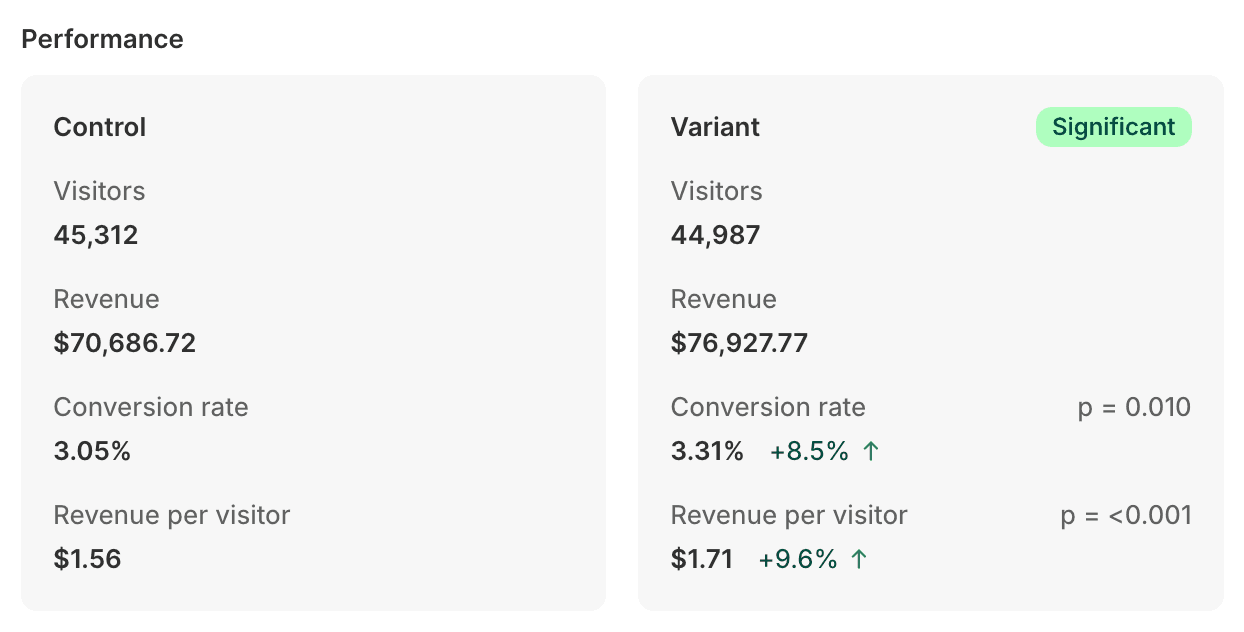
We track revenue per visitor and conversion rate for both groups over the same days, using your real revenue. Revenue per visitor is the headline number. When the result is in, end the test and everyone sees your videos again.
Choosing your split
Uneven splits feel safe and drag your test out
How long a test takes depends on the smaller group, because both groups need enough visitors before the gap between them means anything. A test that wraps up in 68 days at 50/50 can need more than 300 days at 90/10. Nobody wants to wait most of a year for an answer.
When you set the split, Storista uses your Shopify Analytics, if you allow it, to estimate how long the test will take, and warns you if it won't finish in a reasonable time.
| Monthly store visitors | 50 / 50 split | 90 / 10 split |
|---|---|---|
| 1,000,000 | ~4 days | ~2.5 weeks |
| 500,000 | ~1 week | ~5 weeks |
| 100,000 | ~5 weeks | ~5 months |
| 50,000 | ~9 weeks | ~11 months |
| 10,000 | ~11 months | Not realistic |
Rough figures, assuming a 2% store conversion rate and a 15% improvement to detect. Large effects show up sooner, and a higher conversion rate shortens the test. With modest traffic, you can set the test to look only for big changes and get an answer in weeks rather than months.
Reading the result
A status badge in dashboard tells you when it's safe to act
The first day or two. Let it run.
Numbers jump around here. Don't act on them yet.
A direction is showing. OK for low-stakes calls.
The result held up. Act on it.
Nothing meaningful showed up, which is an answer too.
Shopify video A/B testing questions
Will shoppers notice the test?
Is my Shopify store big enough to run a test?
Does hiding videos from half my visitors cost me sales?
Why don't the results match my Shopify reports?
Can I change or pause a test once it's running?
Can I run more than one test at once?
Can I see which group a shopper is in?
Still stuck?